To view full details of a subscription and related transactions, follow these steps:
- Go to Support Manager > Subscriptions.
- Find the subscription. If needed, see Find and view subscriptions.
- Click the subscription ID.
The detailed information on a subscription consists of the following sections:
Plan:
-
Subscription plan name;
Subscription status:
-
A cancellation reason (for cancelled subscriptions);
-
Cancelled: the cancellation date (for cancelled subscriptions);
Trial information:
-
The amount and currency of the trial period;
-
The frequency of charging funds for a subscription in the trial period;
Plan information:
-
The amount and currency of the subscription;
-
Created at: the date that the subscription was created at;
-
Renew at: the date that the subscription should be paid for next time;
-
Active to: the subscription end date;
Linked transactions:
-
UID: a transaction UID;
-
Transaction type: a transaction type, as described in the Transaction management
introductory article, and an icon of a test payment, if applicable; -
Amount: the transaction amount and currency;
- Status: a transaction status, as described in the Transaction management
introductory article; - Created: a transaction creation date;
- Detail: a link to detailed transaction receipt.
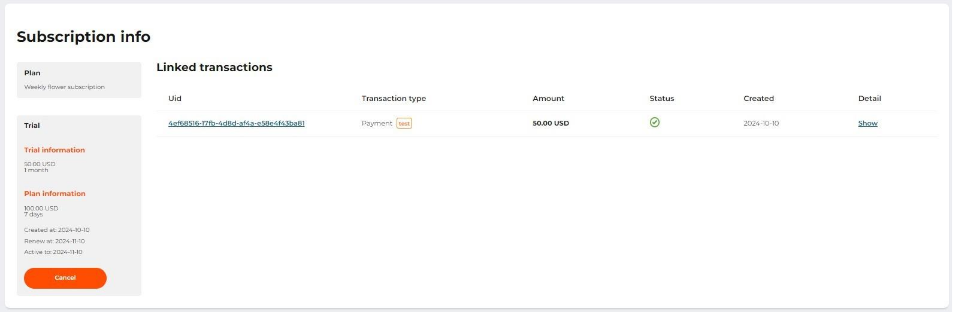
The Subscription details page