The users with the Support Manager role can edit the transaction parameters with the Transaction recovery feature.
Transaction recovery can be requested, for example, in the case when the transaction status in the merchant’s system doesn’t match the one in the eComCharge platform. The option is available for both the card and APM transactions.
To recover a transaction go to Support manager > Transaction recovery.
Insert the transaction UID > Check.
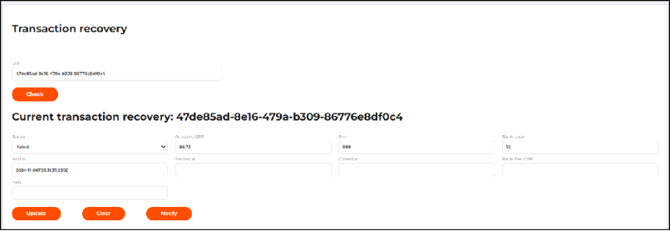
The option is also available on the View Transaction Details page when accessed from the Support Manager tab:
Support Manager > Orders > Transaction Details > Transaction Recovery.
The page displays the fields corresponding to the transaction parameters that can be modified:
-
Status — transaction status.
During transaction recovery, only specific transaction statuses can be assigned. -
Amount — transaction amount.
-
RRN —
-
For card transactions: a retrieval reference number (transaction ID issued by the card processing service).
-
For APM transactions: a transaction identifier in the provider’s system received from the 3rd party.
-
-
Bank code —
-
For card transactions: transaction result code from the bank system.
-
For APM transactions: transaction result code in the provider’s system.
-
-
Paid at — time and date of the payment. The date cannot be in the future.
-
Settled at — date when the payment was settled. Must not be earlier than the date specified in Paid at. The field is available only for card transactions.
-
Bank fee ({transaction_currency}) — absolute commission value calculated by the processing center.
-
Note — description of the reason for the transaction recovery.
Click Update to save the modified transaction parameters. The merchant will receive a webhook notification with the updated transaction parameters.
Use the Notify button to send the webhook notification without modifying the transaction parameters (re-notification).