The system is additionally integrated with the conversion monitor service. This service allows you to quickly recognize a drop of transactions successfully processed by a payment gateway. If the percentage of rejected transactions exceeds the threshold, the system sends out notifications to the users of the payment service provider, who are specified in the system settings, for prompt response and actions to remove a cause of failures.
Conversion monitoring is configured individually for each gateway connected to a merchant's shop.
To specify the threshold for the conversion monitor service, follow these steps:
- Go to Account Manager >
- Go to the shop on the list. If required, use Search for a merchant’s shop.
- Click View to go to the shop settings
- Go to the Gateways
- Click the name of the acquirer who provided the required payment
- Go to the Conversion monitor
- Click
- Set the setting parameters, as described in the table
- Click Apply to save the changes or cancel
Table: Conversion monitor setting parameters
|
Parameter |
Description |
Notes |
|
Allowed percentage of cancelled transactions* |
The allowed percentage of failed transactions out of the set number of transactions for check. |
The system will notify users if the percentage exceeds. |
|
Number of transactions to redo check * |
The number of transactions to be checked for the percentage of failed transactions. |
|
|
*required |
||
If the conversion monitor service was set up earlier, the page will show the number of transactions to check and the allowed percentage of unsuccessful transactions. Click Edit to edit the settings, or Delete to disable the monitor service.
In order for the system to send out the notifications, make sure you have indicated a list of email addresses in the settings. For more information, see System settings.
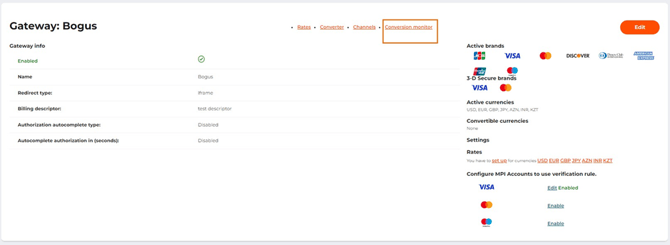 The Conversion monitor tab on the payment gateway settings page
 The Enable button on the conversion monitor settings page

The form to set the conversion monitor settings

The Conversion monitor tab page with the set parameters