To review the configuration and setting details of a payment gateway, follow these steps:
- Go to Account Manager >
- GotothelineoftheshopintheIfrequired,useSearch for a merchant’s shop.
- Click View to go to the shop settings
- Go to the Gateways
- Click the name of the acquirer who provided the required payment
Information on the payment gateway consists of the following sections:
- Gateway info. A section of information about the name of the acquirer, the status of the payment gateway, as well as other parameters that depend on the configuration of the acquirer and gateway.
- Active brands. Logos of all payment methods and brands connected to the gateway.
- 3-D Secure brands. Logos of all payment methods and brands for which the 3-D Secure verification service is enabled.
- Active currencies. A section of supported currencies, transactions in which can be processed by the payment gateway.
- Convertible currencies. A section of currencies for which the conversion to the main currency of the payment gateway will be applied at the Open Exchange rate at the time of the transaction.
- Limits. A section of limits that are configured for the gateway, if applicable.
- Settings. Additional information about the gateway configuration, if any.
- Rates.Alistofacquiringratesinthe<currency code> (Active from <rate start date>)format. If rates are not set, the block displays a notification indicating the list of currencies for which rates must be set. For more information about rates, see Set transaction processing rates.
- Configure MPI Accounts to use verification rule. A section of the current state of the 3-D Secure verification service for the connected payment methods. Links to the 3-D Secure service settings. For more information, see the 3-D Secure verification service.
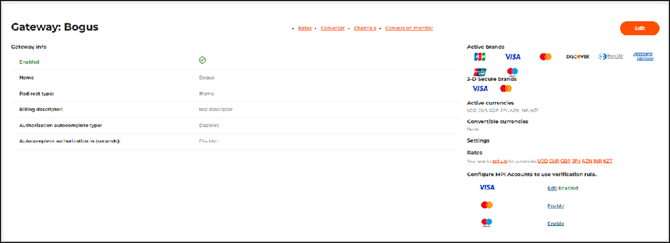 The payment gateway settings page