To view merchants and main information about them, go to Account Manager > Merchants.
The display pane contains a list of merchants registered in the system, with main information and available actions. The page display area consists of a filter panel with fields for searching and selecting the status of merchants and a list of merchants.
The main information about a merchant includes the parameters as described in the table below.
Table: Parameters of the main information about a merchant
|
Parameter |
Description |
Notes |
|
ID |
A registration number of the merchant in the system. |
Assigned automatically in numerical order. |
|
Status |
The activation status. Possible values:
|
For more information about the activation statuses, see the table below. |
|
Company |
The name of the merchant’s company. |
|
|
Contacts |
Merchant details that include:
|
|
|
Shops |
A list of the merchant’s shops that includes:
|
Displayed as hyperlinks to the shop information page. |
The merchant account can have one or several activation statuses, as described in the table below.
Table: Activation statuses of a merchant account
|
Status |
Icon |
Description |
|
Enabled |
|
The merchant account is active. The merchant can accept payments. |
|
Disabled |
|
The merchant account is deactivated. The merchant can not accept payments. |
|
Locked |
|
The merchant account is active, but the access to the back office is blocked because of wrong login credentials entered by the merchant for 5 or more times. |



 By default, the system displays only active merchants. To view deactivated merchants, select Disabled on the filter pane.
Each merchant account is subject to the following actions:
- Edit: to change the registration details of the merchant;
- Add shop: to add a new shop to the merchant account. For more information on adding shops, see Add a shop to a merchant account.
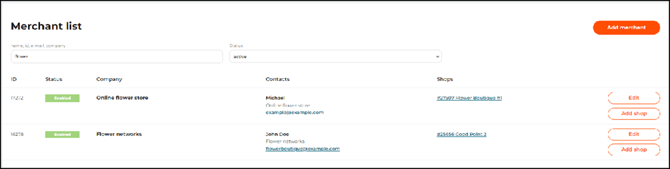
The Merchants tab page with a list of merchants