After the report parameters are set, you can export the report in Excel or CSV format.
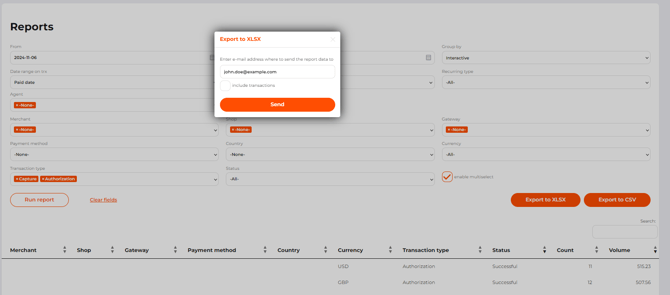
To export the report data to your email, follow the steps below:
-
Go to Account Manager > Reports or Accountant > Reports.
-
Set the parameters for generating the report, as described in Get a transaction report.
-
Click Export to XSLS to download the report in an Excel file, or Export to CSV to download the report in a CSV file.
-
Indicate an email address to which the system should send a report.
-
Activate the Include transactions check-box to receive a report with detailed information on each transaction.
-
Click Send.
The report export file in Excel format can contain no more than 1.048.576 transactions. If the number of the reported transactions is more, please specify the parameters.
|
Column name |
Description |
|---|---|
|
transactions uid |
Transaction UID. |
|
order id |
Order identifier. |
|
tracking id |
Transaction’s identifier in the merchant system. |
|
status |
Transaction status. |
|
description |
Order description. |
|
amount |
Transaction amount in base currency units. |
|
currency |
Transaction currency. |
|
discount rate |
Transaction fee, in %. |
|
transaction rate |
Fixed transaction fee in the transaction currency, in base currency units. |
|
transaction fee |
Total amount of transaction fees, in base currency units. |
|
settled amount |
Amount to be paid to the merchant after deducting commissions, in base currency units. |
|
transaction type |
Transaction type. |
|
created at |
Date and time when the transaction was created. |
|
paid at |
Date and time when the transaction was completed. |
|
settled at |
Date and time when the transaction amount is credited to the merchant's account by the acquirer. |
|
expired at |
Date and time when the order expires, time until which the customer can complete the transaction |
|
message |
Transaction processing result message. |
|
shop id |
Shop identifier in the PSP system. |
|
shop |
Shop name in the PSP system. |
|
bank acquirer |
Gateway/bank name. |
|
gateway note |
Gateway note field value in the gateway settings. |
|
business category |
Business category of the shop. |
|
bank id |
Transaction identifier in the acquirer’s system. |
|
first name |
Customer’s first name. |
|
last name |
Customer’s last name. |
|
address |
Customer’s billing address. |
|
country |
Customer’s billing country. |
|
city |
Customer’s billing city. |
|
postal code |
Customer's billing ZIP or postal code. |
|
state |
Customer’s billing state or region. |
|
phone |
Customer’s phone. |
|
ip |
Customer’s IP address. |
|
|
Customer’s email. |
|
brand |
Card brand. |
|
merchant id |
Merchant identifier in the PSP system. |
|
merchant country |
Merchant’s country. |
|
merchant company |
Merchant’s company name. |
|
amount after conversion |
Transaction amount after conversion. |
|
currency after conversion |
Transaction currency after conversion. |
|
gateway id |
Gateway identifier in the PSP system. |
|
recurring type |
Recurring type of the transaction. |
|
payment method fields |
Adds payment method fields to the report. |
|
connection type |
Connection type field value in the gateway settings. |
|
response code |
Transaction processing result code. |
|
initial amount |
Initial transaction amount. |
|
surcharge amount |
Applied surcharge amount. |
|
exchange rate |
Exchange rate used for the transaction conversion. |
|
settled amount after conversion |
Converted transaction amount to be paid to the merchant, in base currency units. |
|
transaction fee after conversion |
Total amount of transaction fees after conversion, in base currency units. |
|
gateway alias |
Official name of the bank or acquirer. One gateway alias can correspond to multiple gateways. |
|
agent fields |
Adds agent fields to the report. |
The following items are not available for the users without the Personal data access permission: First name, Last name, Address, City, Postal code, State, Phone, IP, E-mail, Card holder.
As soon as the report is generated, a link to the report is sent to the indicated email address. The link expires in 72 hours. To access the report, the user must be logged into the system using the same account as the one used for exporting the report.
The Excel file can contain one or several sheets with data in columns. The report view and the number of sheets in the file depend on what report parameters are set and whether the detailed transaction information was requested.
The first sheet contains the overall basic information on the transactions processed during the set reporting period, as it can be seen in the Reports tab in the back office.

.png?hsLang=en)
If you click Export to CSV, you will get a link to your email address. Click the link and save the ZIP archive. The archive contains:
-
description.txt - a file with the reporting period and time zone description;
-
totals.csv - a file with the overall information on the reported transactions;
-
one or several files in the {payment method}.csv format - a file with data on transactions initiated by a payment method which is indicated in the file name
.png?width=670&height=88&name=Example%20of%20the%20%E2%80%9Ctotals.csv%E2%80%9D%20file%20(part).png)