To get a list of transactions in the XLSX format, follow the steps below:
-
Go to Account Manager > Orders or Support Manager > Orders.
-
Set the search parameters, as described in the table below.
-
Click Find.
-
Click Export to XLSX.
The downloaded file includes sheets for transactions made by card and alternative payment methods. Transactions processed by alternative payment methods with counters are listed on a separate sheet.
Limitations:
-
The list of search results can be downloaded only if it contains no more than 5000 transactions. If there are more, you need to specify the search request and repeat the export.
-
You can export only a report with live transactions. Test transactions are not included.
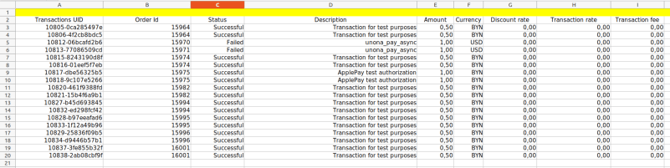
A report sample (only part of the columns visible)