If the payment service provider uses the 3-D Secure MPI of the system developer, you need to enable the 3-D Secure verification service when connecting a payment gateway to a merchant’s shop.
To do this:
-
Go to Account Manager → Shops.
-
Find the shop in the list. If needed, use the Search function.
-
Click View to open the shop settings page.
-
Go to the Gateways tab.
-
Click the name of the acquirer that provided the payment gateway.
-
On the payment gateway settings page, scroll to the Configure MPI Accounts to Use Verification Rule section and click Enable for the desired payment brand.
-
Set the 3-D Secure verification parameters as described in the table below.
-
Click Apply to save the changes or Cancel to discard them.
Table: The 3-D Secure verification service parameters
|
Parameter |
Description |
Notes |
|
Merchant name* |
The merchant's company name as specified in the agreement with the acquiring bank. |
The valid data for this field are provided by the merchant's acquiring bank. |
|
Merchant ID* |
The merchant's ID in the acquiring bank. |
The valid data for this field are provided by the merchant's acquiring bank. |
|
Merchant country* |
The country where the merchant's company is registered. |
The valid data for this field are provided by the merchant's acquiring bank. |
|
Acquirer BIN* |
The BIN (Bank Identification Number) of the acquiring bank. |
The valid data for this field are provided by the merchant's acquiring bank. |
|
Merchant category code |
A four-digit number of the MCC (Merchant Category Code) that defines the merchant's category. |
The valid data for this field are provided by the merchant's acquiring bank. |
|
Use 3D Secure 1.0 |
The option to apply only the 3-D Secure 1.0 verification scheme to processed payments. |
By default, both 3-D Secure 2.0 and 3-D Secure 1.0 verification schemes are applicable. |
|
Enabled |
The check-box to activate the 3-D Secure verification service for the payment gateway. |
|
|
*required |
||
To change the 3-D Secure verification settings, click Edit at Step 6 of the flow described above.
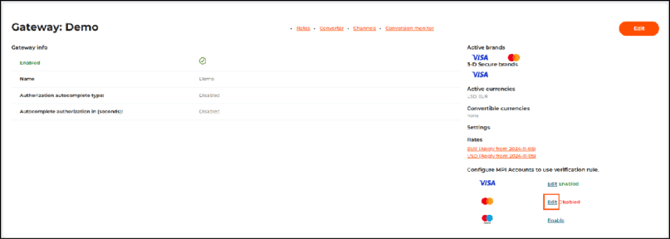 The Edit button on the payment gateway settings page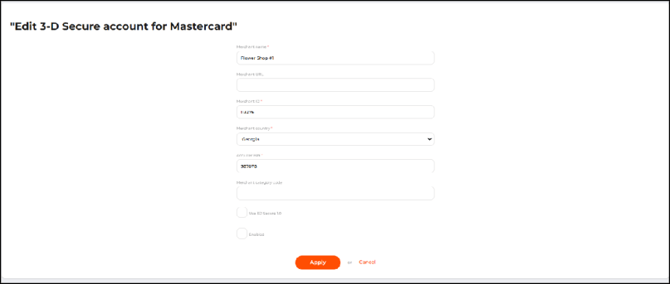
The Edit 3-D Secure account page