Create a plan
To create a plan, follow these steps:
- Go to the Plans tab page.
- Click Add a plan.
- Fill out the form according to the description of the fields in the table below.
- Click Confirm to save the settings.
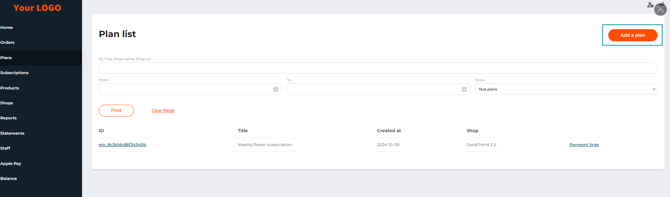
The ‘Plans’ tab and the ‘Add a plan’ button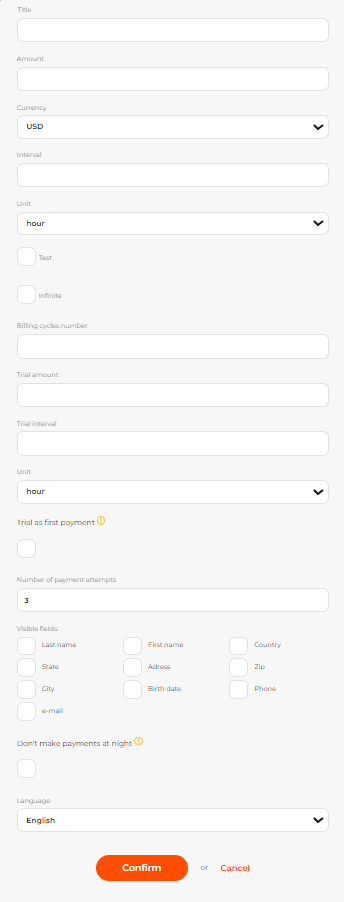 The form for adding a new plan
When creating a plan, please specify:
Table: Plan parameters
| Parameter | Description |
|---|---|
| Shop | Select the shop you want to create a plan for. This field is available if the merchant has more than one shop. |
| Title | A plan name. |
| Amount | An amount or recurring debiting. |
| Currency | A currency of recurring debiting. |
| Interval | An interval for recurrent charges. |
| Unit | Unit of measurement for the recurrent debiting. |
| Test | If this option is enabled, the plan is a test plan. |
| Infinite | If this option is enabled, the number of subscription renewals is unlimited. |
| Billing cycles number | This field is available if the Infinite option is disabled. Set the number of billing cycles for each user. |
| Trial amount | The amount that will be debited for enabling the test period. |
| Unit | A time unit for the trial period (hours, days, months). |
| Trial as first payment | If the Trial as first payment option is not enabled, the system will deactivate the subscription after the trial period if the first attempt to withdraw funds for the regular period is unsuccessful (for example, insufficient funds). If the Trial as first payment option is enabled, the system considers the payment for the trial period as the first regular payment. Thus, the system will constantly attempt to withdraw funds, but the subscription will not be cancelled automatically (the customer will be able to continue using it without paying). This increases the risk of using stolen, "single-use" cards and cards with an insufficient balance. If the customer is conscientious, the bank will send the customer a notification of insufficient funds (for example, via SMS), and the customer can top up his balance to pay for the subscription. |
| Number of payment attempts | After the number of payment attempts exceeds the number specified in the field, the subscription is cancelled. |
| Visible fields: first and last name, country, state, address, zip, city, birth date, phone, email | Fields visible to the client during the payment. All the selected fields except phone are required. |
| Don’t make payments at night | If the option is active, the system charges customers only during the period from 8:00 AM to 8:00 PM in the time zone set for the system by the payment service provider. |
| Language | Set the language of the payment page. |